

 How to use bonjour over vpn
What is bonjour?
Bonjour is a very nice zero configuration service enabled on Mac computers by default.
If you are a Mac user, you should be familiar with the finder and it’s many features. You know how to browse the files on your server, the printer is configure by default and you can Remote Desktop the other computers in your network. When you are outside of the enterprise network it seems that finder can’t find anymore the enterprise resources even if the vpn is connected.
[gard]
Why Bonjour doesn’t work with the normal vpn?
Bonjour relies on multicast and by default, the multicast doesn’t cross routers. Since the normal vpn are consider router, the multicasts from the mac servers in the enterprise, are not forwarded to the mac clients outside of your enterprise network.
How to enable Bonjour or Mac zero configuration service over a vpn?
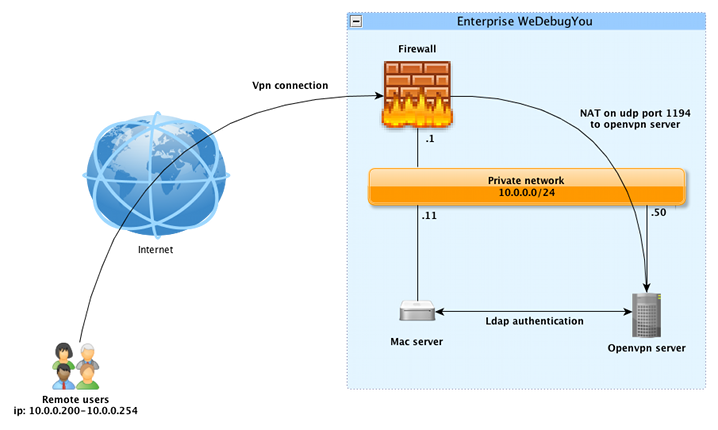
The trick is to use a “bridge” vpn. Once the bridge vpn is connected, it will simulate a virtual connection to your enterprise office but without router. This way, the computer connected over vpn will receive the Bonjour multicasts. Then, the finder will show you all your enterprise services just like if you were in the office. Every time you add new services like printer, new servers, etc, they will be automatically advertise over the vpn. You don’t need to manually add configuration. This Bonjour over vpn setup really is zero configuration.
[gard]
Do I have to install a package on the mac client?
Yes you will need to use the free Tunnelblick package. We package it in a way that it include all the configurations and you will only need to click on the icon.
How do I setup the bonjour vpn?
We recommend to use openvpn for this task. It’s opensource, secure, free and it has many features. There is a very excellent guide on how to install/configure openvpn on CentOS.
Is it compatible with iPhone?
Unfortunately the “bridge” vpn are not working on iPhone. There are many users putting pressure on apple to add the feature.
I need help to set it up. Can you help me?
We provide a Virtualbox appliance with 2 vpn keys.



Jean Debogue
Latest posts by Jean Debogue (see all)
- Phoenix project: Canada first - March 2, 2018
- How to install sieve for dovecot on CentOS 6? - February 8, 2014
- How to Protect Successfully your network against DDoS attacks: 5 steps - November 23, 2013

Hi, i believe that i saw you visited my weblog thus i came to go back the want?.I’m trying to in finding things to enhance my site!I suppose its good enough to use some of your ideas!!